Skip to content

Blog

Tools to Summarize Papers: A Game-Changer for Researchers

In the world of academic research, time is precious. With the ever-growing number of papers being published, researchers often find themselves overwhelmed by the volume of information they need to process. To save valuable time and improve efficiency, researchers have turned to paper summarization tools that can provide quick insights into lengthy documents. Here are the top tools to help you summarize papers quickly and effectively.

1. Scholarcy: Your Ultimate Paper Summarizer

Section titled “1. Scholarcy: Your Ultimate Paper Summarizer”

Scholarcy leads the charge as one of the best tools for summarizing academic papers. This AI-powered platform quickly extracts key points from research papers, providing an in-depth summary that includes the abstract, key findings, methodology, and more. Scholarcy can also generate a ‘flashcard’ summary, helping you grasp the essential points even faster.

Whether you’re working on a thesis or simply reviewing literature, Scholarcy offers a highly efficient and user-friendly way to get to the heart of research papers. Plus, its integration with reference management tools like CiteDrive allows you to organize and manage your summaries with ease.

2. ChatGPT: A Versatile Summarization Assistant

Section titled “2. ChatGPT: A Versatile Summarization Assistant”

ChatGPT isn’t just for conversation – it can also be a powerful tool for summarizing papers. With its ability to understand context and break down complex information, ChatGPT can condense lengthy papers into bite-sized summaries. Simply paste the text into ChatGPT, and it will provide a concise summary while retaining the key points.

ChatGPT can also answer follow-up questions, helping you dive deeper into specific sections of a paper without reading through the entire document. For more specialized research, you can ask ChatGPT to focus on specific aspects like methodology, results, or discussions, making it an incredibly flexible tool for any researcher.

For those dealing with PDF versions of research papers, ChatPDF is a game-changer. This tool allows you to upload a PDF and ask it to summarize the content for you. Unlike traditional summarization tools, ChatPDF processes the PDF in its entirety, making it easier to access and understand the material, even if it’s not in text-based formats.

ChatPDF excels in its ability to summarize papers in various scientific fields, providing you with the key insights you need in seconds. It’s an excellent option for researchers who frequently work with PDF documents and want to avoid the hassle of manually extracting data.

4. Gemini: Cutting-Edge AI for Paper Summarization

Section titled “4. Gemini: Cutting-Edge AI for Paper Summarization”

Google’s Gemini AI has made waves in the research community, offering advanced summarization capabilities. Like Scholarcy, Gemini can quickly break down lengthy research papers into manageable summaries. However, it takes things a step further by analyzing and cross-referencing data, offering deeper insights into the paper’s relevance and impact on current research.

With its ability to summarize both academic papers and articles from a wide range of fields, Gemini is an excellent tool for researchers looking to explore new topics or compare papers within a specific area of study.

5. Paper Digest: A Fast, Focused Summary Tool

Section titled “5. Paper Digest: A Fast, Focused Summary Tool”

Paper Digest is another excellent tool that specializes in summarizing research papers quickly. It provides concise summaries of papers, highlighting the most important findings, key research questions, and conclusions. The tool is particularly useful for those who need a fast overview of a paper without the details.

Paper Digest is ideal for busy researchers who don’t have time to read every paper in full but still need to stay up-to-date with the latest developments in their field. The summaries are clear, to the point, and often include essential data points, such as statistical analyses or experimental results.

As academic research continues to evolve, the ability to quickly summarize and understand papers becomes increasingly valuable. Tools like Scholarcy, ChatGPT, ChatPDF, Gemini, and Paper Digest can save you time, help you stay organized, and make sure you’re always ahead of the curve when it comes to new research.

Whether you’re trying to quickly absorb the key points of a paper or delve deeper into specific sections, these summarization tools are a researcher’s best friend. By using these tools, you can streamline your research process and focus on what truly matters: your work and your discoveries.

A Reference Manager that Supports BibLaTeX: Meet CiteDrive

Managing references doesn’t have to be a hassle—especially when you’re writing in LaTeX and using BibLaTeX for citations. Whether you’re working on your thesis, collaborating on a paper, or just collecting sources for future reading, there’s one tool built to streamline your workflow from start to finish: CiteDrive.

Unlike traditional reference managers that cater mostly to Word users, CiteDrive is a modern, web-based reference manager designed specifically for LaTeX and Markdown writers. It brings your bibliography to the cloud, supports BibLaTeX out of the box, and makes it easy to collect, organize, and cite sources—anywhere, anytime.

If you’re writing academic documents in LaTeX, chances are you’re already using BibLaTeX for its flexibility and advanced citation features. But finding a user-friendly tool that supports BibLaTeX natively? That’s rare.

CiteDrive is built for BibLaTeX, not as an afterthought but as a first-class citizen. That means:

  • Proper BibLaTeX field support (no awkward workarounds)
  • Smooth export to .bib files
  • Compatible with Overleaf, TeXstudio, and other LaTeX editors

🚀 Save Sources Instantly with the Chrome Extension

Section titled “🚀 Save Sources Instantly with the Chrome Extension”

Imagine you’re browsing an article, paper, or blog post and want to cite it later. With CiteDrive’s Chrome extension, you can save it with one click. It automatically extracts the metadata and formats it into a BibTeX/BibLaTeX entry—perfectly formatted and added to your chosen project.

No more manual copying, formatting, or typing up citations. Just click, save, and it’s ready to cite.

Thesis. Literature Review. Paper A. Paper B. With CiteDrive’s project-based structure, you can keep your work organized. Each project acts like a folder with its own .bib file, so you’re never mixing references between unrelated work.

This is especially helpful if you’re juggling multiple papers or writing with different citation styles.

Writing with co-authors or supervising students? CiteDrive lets you collaborate on projects with others. Share a project, contribute sources together, and keep your reference list in sync—without emailing .bib files back and forth.

It’s like Google Docs, but for your bibliography.

No installs. No outdated desktop apps. CiteDrive runs entirely in the browser, so it works on any device, anywhere you go. Whether you’re on your laptop, tablet, or phone, your references are always just a few clicks away.

It integrates smoothly with platforms like Overleaf, and gives you a live .bib file that stays updated as you work.


  • ✅ Native BibLaTeX and BibTeX support
  • 🧩 Chrome Extension for quick citation capture
  • 📁 Organize references by project (thesis, articles, etc.)
  • 👥 Collaborate with co-authors and colleagues
  • ☁️ 100% web-based, Overleaf-compatible
  • 🔄 Real-time syncing of .bib files
  • 💾 Export anytime in .bib, .json, .csv, and more

Start Managing Your BibLaTeX References the Smart Way

Section titled “Start Managing Your BibLaTeX References the Smart Way”

Whether you’re deep into your PhD thesis or co-authoring your next publication, CiteDrive gives you a clean, efficient, and LaTeX-friendly way to manage your references. Try it today and see how simple reference management can be.

👉 Get started with CiteDrive – the reference manager built for LaTeX.

Beyond Overleaf: How CiteDrive Supports Every LaTeX Editor for Effortless Citation Management

Introduction: When it comes to reference management, CiteDrive has made a name for itself as a powerful tool for Overleaf users, providing seamless integration with this popular LaTeX editor. However, what many don’t realize is that CiteDrive is not limited to Overleaf alone—it’s a versatile solution that works with any LaTeX editor. Whether you’re using TeXShop, TeXworks, Vim, or any other LaTeX tool, CiteDrive can manage your references, streamline your workflow, and help you stay organized, no matter your platform.

In this post, we’ll explore how CiteDrive can help you manage your citations in BibTeX and BibLaTeX formats, no matter which LaTeX editor you’re working with.

Why CiteDrive is Perfect for Every LaTeX Editor User

Section titled “Why CiteDrive is Perfect for Every LaTeX Editor User”

While CiteDrive is often associated with Overleaf, it’s designed to work seamlessly across the board with any LaTeX editor. This means you get all the great benefits of CiteDrive, no matter which LaTeX platform you prefer. Here’s why you should consider using CiteDrive, whether you’re working in Overleaf or any other LaTeX editor.

1. Full Compatibility with All LaTeX Editors:

Section titled “1. Full Compatibility with All LaTeX Editors:”

CiteDrive isn’t just for Overleaf users. Whether you use TeXShop, TeXworks, Vim, or any other LaTeX editor, CiteDrive supports BibTeX and BibLaTeX, which means it works effortlessly with all of them. You don’t have to worry about switching platforms or losing compatibility when managing your references across different LaTeX editors.

2. Chrome Extension to Save Websites and Articles as BibTeX/BibLaTeX Entries:

Section titled “2. Chrome Extension to Save Websites and Articles as BibTeX/BibLaTeX Entries:”

One of the most convenient features of CiteDrive is its Chrome extension. This extension allows you to save any article, webpage, or research material as a BibTeX or BibLaTeX entry directly into your CiteDrive library. Whether you’re using Overleaf or a different LaTeX editor, you can quickly add references to your project without manually inputting citation data.

CiteDrive is built for collaboration. You can easily share and collaborate on different research projects—be it a thesis, academic paper, or any other project. Invite colleagues to join your project, and everyone will have access to the same up-to-date reference library. This works seamlessly, whether you’re using Overleaf or other LaTeX editors like TeXShop or TeXworks. CiteDrive ensures smooth collaboration across platforms and makes teamwork easier.

4. Multiple Projects, One Easy-to-Use Platform:

Section titled “4. Multiple Projects, One Easy-to-Use Platform:”

CiteDrive allows you to organize your references for multiple projects without any hassle. Whether it’s a thesis, journal paper, or research notes, you can manage all your projects in one central location. Switch between your projects with ease, keeping your references organized and ensuring that no citations are mixed up, regardless of which LaTeX editor you use.

CiteDrive is web-based, which means you don’t have to worry about syncing your data or dealing with complex software setups. You can access your CiteDrive library from any device with an internet connection, making it easy to stay productive no matter where you are. Whether you’re working on Overleaf at home or using TeXShop on a different computer, all your references are securely stored and available across all your devices.

6. BibTeX and BibLaTeX Support for All Your Citation Needs:

Section titled “6. BibTeX and BibLaTeX Support for All Your Citation Needs:”

CiteDrive’s support for BibTeX and BibLaTeX ensures that your references are always formatted correctly for LaTeX. Whether you’re working on a LaTeX project in TeXworks, Vim, or Overleaf, CiteDrive helps you keep your bibliographies in perfect order, generating the right format and making citation management a breeze.

Conclusion: Get the Best of Both Worlds with CiteDrive

Section titled “Conclusion: Get the Best of Both Worlds with CiteDrive”

CiteDrive offers the perfect solution for anyone who uses LaTeX editors, not just Overleaf. Whether you prefer TeXShop, TeXworks, Vim, or any other LaTeX tool, CiteDrive’s seamless support for BibTeX and BibLaTeX allows you to organize your references efficiently and collaborate with others without the hassle of switching platforms. Plus, its Chrome extension for easy citation saving and cloud-based accessibility makes managing your references simpler than ever.

If you’re ready to take control of your citation management, try CiteDrive today and discover how it works with all LaTeX editors, not just Overleaf.

Call to Action: Don’t let your citation management slow you down. Try CiteDrive now and experience how easy it is to manage your references across all LaTeX editors. Whether you’re in TeXShop, Vim, TeXworks, or Overleaf, CiteDrive is the ultimate tool to simplify your workflow. Start your free trial today!

Collaborating on LaTeX Projects? Here’s Why You Need CiteDrive

Working on a LaTeX document as a team can be powerful—but managing references together? That’s where things often fall apart.

If you’ve collaborated on a paper using Overleaf, you’ve probably run into at least one of these issues:

  • Conflicting .bib files
  • Someone forgets to add that key citation
  • Emailing reference lists back and forth
  • Confusion over which bibliography is the “real” one

Sound familiar? That’s where CiteDrive steps in.

CiteDrive is a cloud-based BibTeX reference manager built specifically for LaTeX and Overleaf users. It makes managing references seamless—especially when you’re working with others.

Unlike general-purpose reference tools, CiteDrive is purpose-built for the academic writing process, with real-time collaboration features and native BibTeX support.

Why Shared Bibliographies Are a Game-Changer

Section titled “Why Shared Bibliographies Are a Game-Changer”

When multiple people are contributing to the same paper or thesis, managing the bibliography becomes tricky. With CiteDrive, you can:

  • Create a shared bibliography that all collaborators can access and edit
  • Keep everything organized in one central place—no more version mismatches
  • Automatically sync updates with Overleaf using a direct BibTeX link
  • Ensure that everyone is citing from the same source list

No more manually updating .bib files or dealing with merge conflicts.

Here’s a refactored and streamlined version of the section:

CiteDrive integrates smoothly with your Overleaf projects, making reference management effortless.

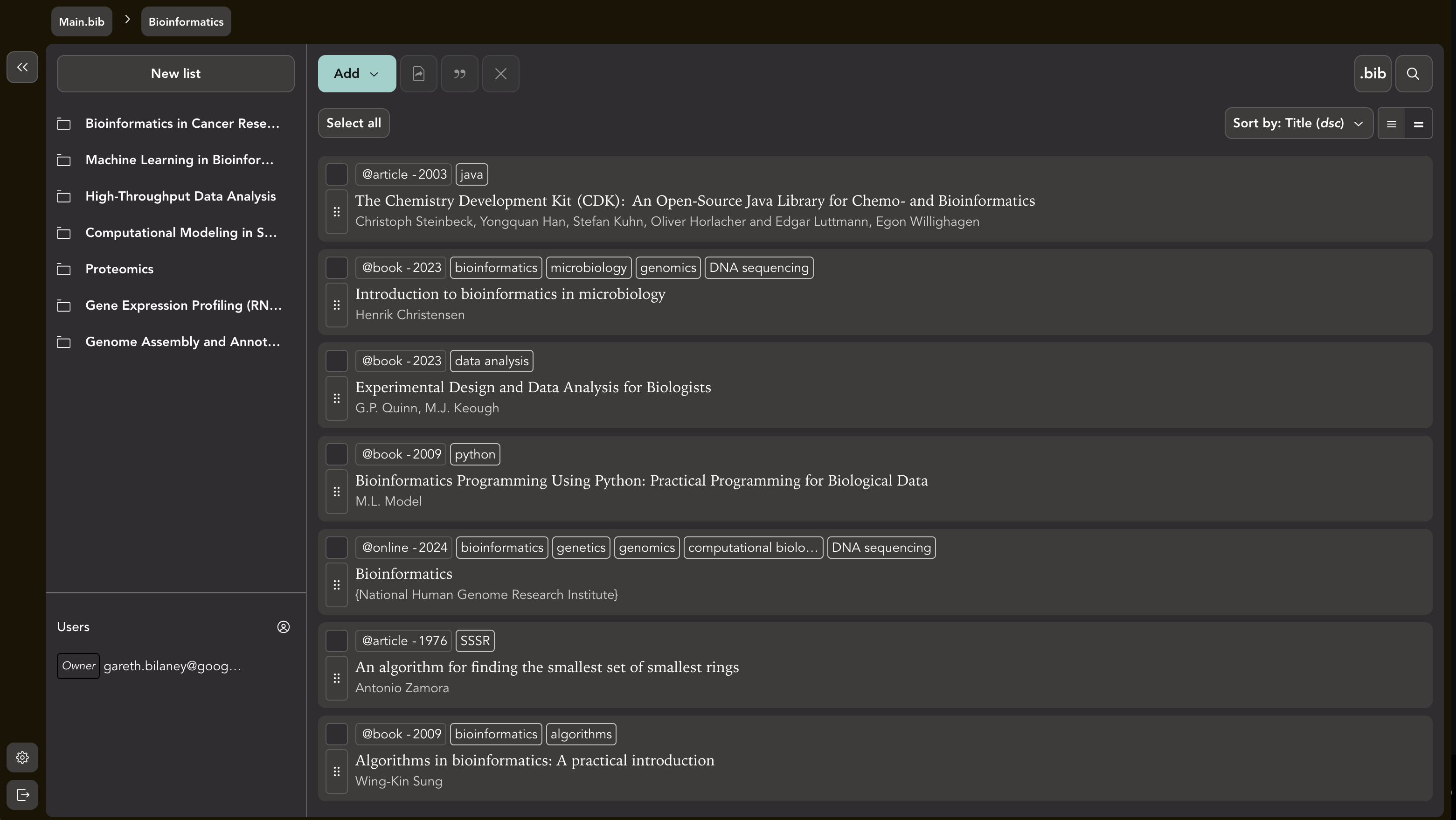
To link your CiteDrive project with Overleaf, simply click the .bib button at the top-right corner of your CiteDrive project page:

CiteDrive 3.0 blog post

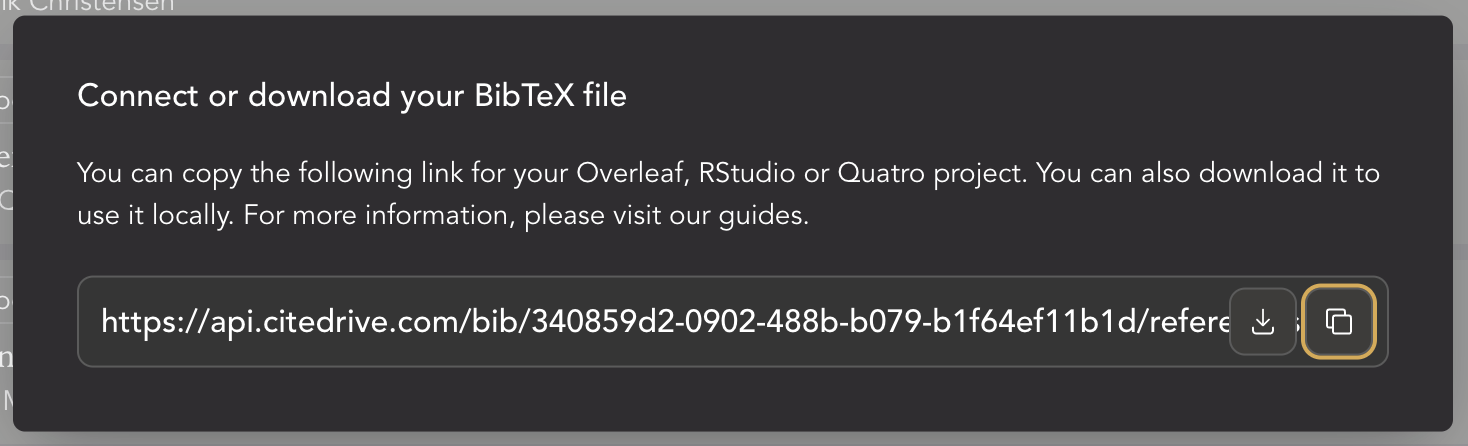
Next, copy the provided BibTeX link to connect both applications.

CiteDrive 3.0 blog post

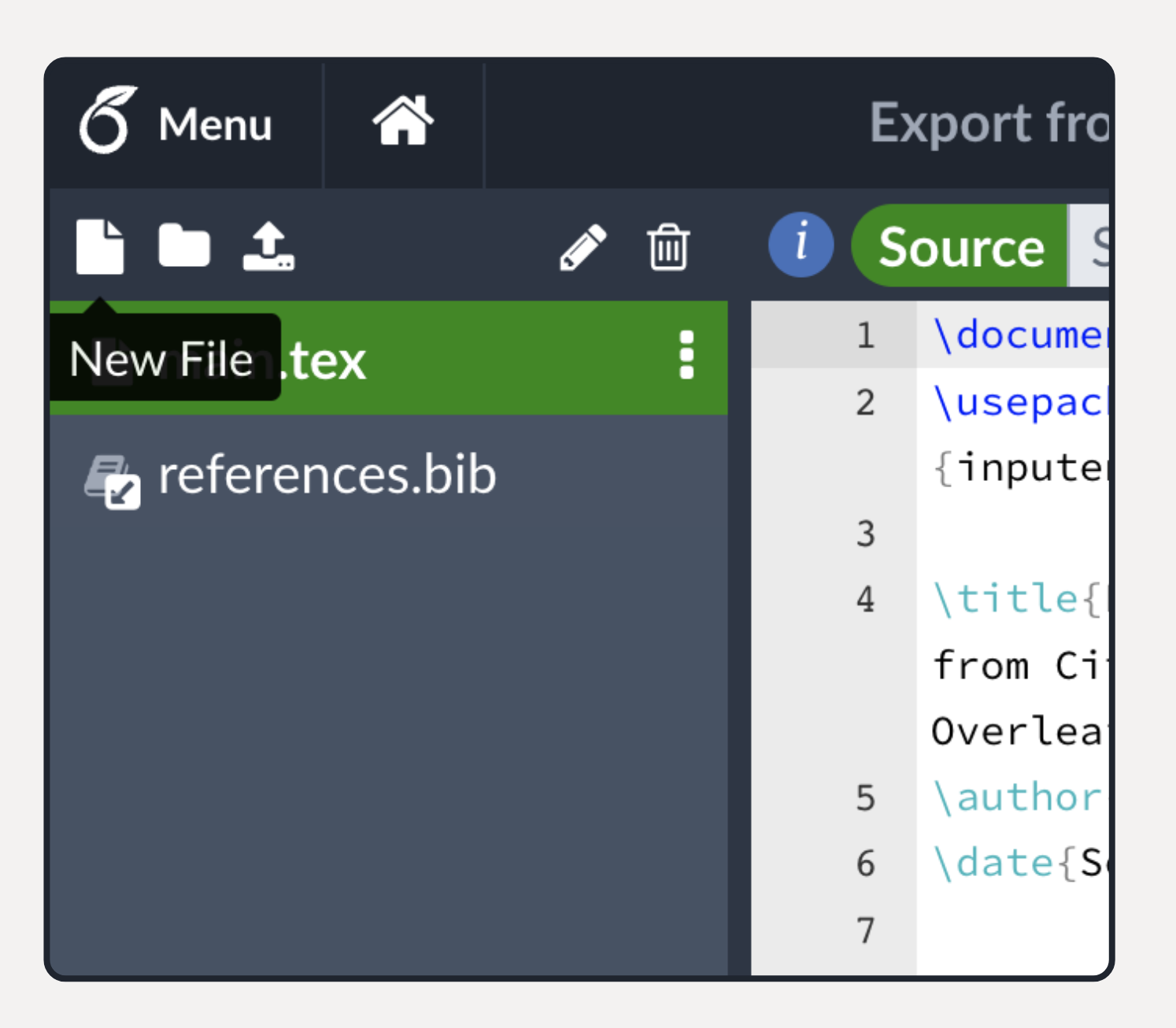
Now, head over to Overleaf. Click the New File icon and select From External URL:

CiteDrive 3.0 blog post

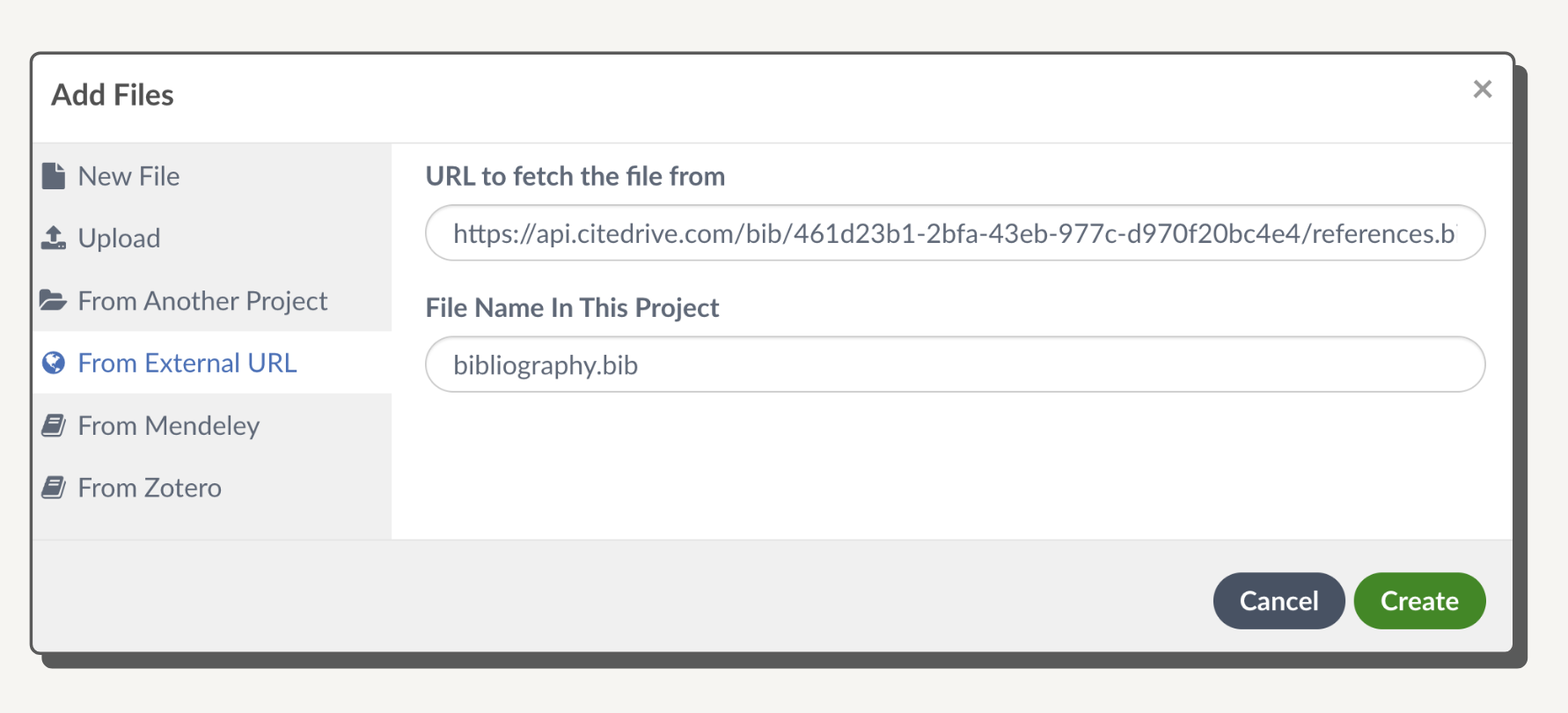
Paste the CiteDrive link into the URL to fetch the file from text field:

CiteDrive 3.0 blog post

Once done, click Create to import your bibliography.bib file into your LaTeX project. Simply use \bibliography{bibliography} to integrate it into your document. Your bibliography is now synced and stays up-to-date automatically.

Built for Research Teams, Students, and Labs

Section titled “Built for Research Teams, Students, and Labs”

Whether you’re:

  • Collaborating on a group assignment
  • Co-authoring a research paper
  • Working across departments or institutions
  • Writing a multi-author grant proposal

CiteDrive helps your team stay aligned, organized, and efficient.

You can even manage multiple projects, with each team or paper having its own dedicated BibTeX file.

Here’s what CiteDrive enables:

Real-time collaboration on references
Clean BibTeX entries without formatting issues
Less time spent managing references, more time writing
Always up-to-date citations across all team members

Ready to simplify your collaborative writing process?

CiteDrive is free to get started, and built to grow with your projects. Whether you’re working solo or with a team, it’s the easiest way to manage BibTeX references—especially inside Overleaf.

👉 Start your first project now

Collaborating on R Markdown Projects? Here’s Why You Need CiteDrive

If you’re an R Markdown user looking for an efficient way to manage citations and references, CiteDrive is the perfect solution. This web-based reference manager is designed to seamlessly integrate with RStudio, making it easier than ever to handle bibliographies and insert citations into your R Markdown documents. In this guide, we’ll walk you through setting up CiteDrive, importing references, and incorporating citations into your R Markdown workflow.

Step 1: Create Your CiteDrive Account and Add References

Section titled “Step 1: Create Your CiteDrive Account and Add References”

To get started with CiteDrive, first create a free account by visiting the CiteDrive website. Once your account is set up, create a new “R-Markdown” project. You can easily add references to your project in formats like BibTeX or BibLaTeX.

Your dashboard will allow you to organize and manage references for your project, making it a breeze to get your bibliography in order.

CiteDrive Dashboard

Step 2: Sync Your R Markdown Document with CiteDrive

Section titled “Step 2: Sync Your R Markdown Document with CiteDrive”

Once your references are in CiteDrive, you’ll want to sync them with your R Markdown document. Here’s how to do it:

  1. In CiteDrive, click on the “bib” button. This will open a new tab containing all of your BibTeX entries.
  2. Copy the URL of your bibliography and paste it into the YAML section of your R Markdown file, like so:
---bibliography: "URL"---

This will link your R Markdown document to your CiteDrive project.

Step 3: Copy Citation Keys for Easy Referencing

Section titled “Step 3: Copy Citation Keys for Easy Referencing”

Now that your references are set up, it’s time to start citing them in your document. Here’s how to easily copy citation keys:

  1. In your CiteDrive project, navigate to the settings by clicking on your avatar in the top right corner.
  2. Select the citation key mode “Pandoc/R Markdown/Quarto”.
  3. Choose the references you want to cite and click the “cite” button to copy the citation key to your clipboard.

Once the citation key is copied, return to your R Markdown document and insert it where you want the citation to appear.

Citation Key Insertion

After inserting the citation key in your R Markdown file, click “render.” Your in-text citation will appear in the correct format, and the full reference will be automatically added at the end of your document.

CiteDrive makes managing bibliographies and inserting citations in R Markdown documents effortless. With its user-friendly interface, powerful citation management features, and seamless integration with RStudio, it’s the ideal tool for researchers and academics who need to streamline their citation process.

Key Benefits of Using CiteDrive with R Markdown:

  • Easy Reference Management: Quickly add and organize references in your CiteDrive project.
  • Seamless R Markdown Integration: Automatically sync references and citations in your documents.
  • Simple Citation Insertion: Effortlessly copy and paste citation keys into your R Markdown file.
  • Collaboration Made Simple: Share your project with team members and collaborate on references in real-time.

Start using CiteDrive today and take the hassle out of managing citations in your R Markdown documents!