Skip to content

Blog

The CiteDrive Companion for Overleaf and RStudio

It has never been so easy to collect academic papers. Just click the CiteDrive button when you want to cite. This will automatically add any article you see in the browser to your Overleaf or RStudio project.

Featured Image

Looking for new papers to read can be time-consuming, especially if you’re unsure where to start. CiteDrive aims to make finding new papers quick and easy by allowing you to add papers directly to your Overleaf document while browsing for them. Install the CiteDrive companion, and you’ll be able to add articles to your document with just a few clicks. Import citations from major research aggregators straight into your Overleaf or RStudio project. The companion has you covered for wherever you’re looking on Google ScholarPubMedarXivSpringerACMIEEECNKI, and other sites.

The following browsers support the extension:

Here is an example of how the CiteDrive companion works in Google Scholar:

  1. Download and install the CiteDrive extension (links above)

  2. Go to Google Scholar and find an article you want to cite

  3. Click on the CiteDrive icon in your browser’s toolbar

  4. Choose your project, for example, the one you’ve linked to your Overleaf project; if everything’s fine, click Add Reference.

That’s all there is to it! The reference will now be available in your CiteDrive project and your Overleaf (or RStudio projects, depending on your preferences). You’ll be able to preview it or edit it as needed.

Data Visualization Packages for R you should check out in 2022

In the following, we have listed exciting libraries in R for data visualization that you should check out. Test

As part of the robust tidiyverse ecosystem, ggplot2 offers the most feature-rich and versatile graph creation package based on the grammar of graphics framework. This principle divides graphs into components such as datasets, scales, levels, etc. The user combines these components to describe and create any diagram in a declarative fashion.

This approach has become so widely accepted that it has effectively replaced R’s native diagrams and added several extensions, some of which we will mention here.

Leaflet by Volodymyr Agafonkin is one of the most popular open-source JavaScript libraries for interactive maps, used by the New York Times and the Washington Post. Leaflet for R offers an easy way to integrate leaflet maps into R.

With ggplot2- and leaflet, we have already introduced two practical tools. With simplevis, the aim is to facilitate visualization with less brainpower by providing a package of wrapper functions of these two packages.

gganimate is an extension of ggplot, which makes it possible to create diagrams with beautiful animations in R.

The grammar principle is extended by a series of additional components that the data scientist can add to the ggplot object to represent how it should change over time.

In keeping with the philosophy of ggplot2 (and the grammar of the graphics), ggvis makes it possible to create interactive graphics that the user can test either in Rstudio or in the browser using the shiny infrastructure.

Enables the creation of interactive 3D graphics in R based on OpenGL or WebGL in the backend.

Inspired by Peter Shirley’s three books on ray tracing, this open-source R package allows you to do the same thing when creating 3D scenes in R.

This R package provides a collection of wrapper functions around the JavaScript library of the same name in R. Highcharts (JavaScript) is already used as a flexible and customizable chart library by BBC, Sony, and Twitter.

With Plotly, the focus is on interactive, publication-quality diagrams. You will find examples for creating line charts, scatter plots, area plots, etc.

With a focus on multivariate data, Lattice is a powerful and equally elegant high-level data visualization system inspired by Trellis graphics. While sufficient for typical graphing needs, Lattice is flexible enough to meet most non-standard requirements.

CiteDrive 3.0: Information on the upcoming version

For months we have been working on CiteDrive 3.0, a complete revision of the previous version. We are happy to announce that the new version will be released soon! Here is some information about the changes to give you the first insight.

We are bringing reference management to R Markdown. 

Section titled “We are bringing reference management to R Markdown. ”

CiteDrive 3.0 will primarily appeal to R Markdown and Quarto users and is fully collaborative, 100% user-centric, and 100% Bib[La]TeX enabled.
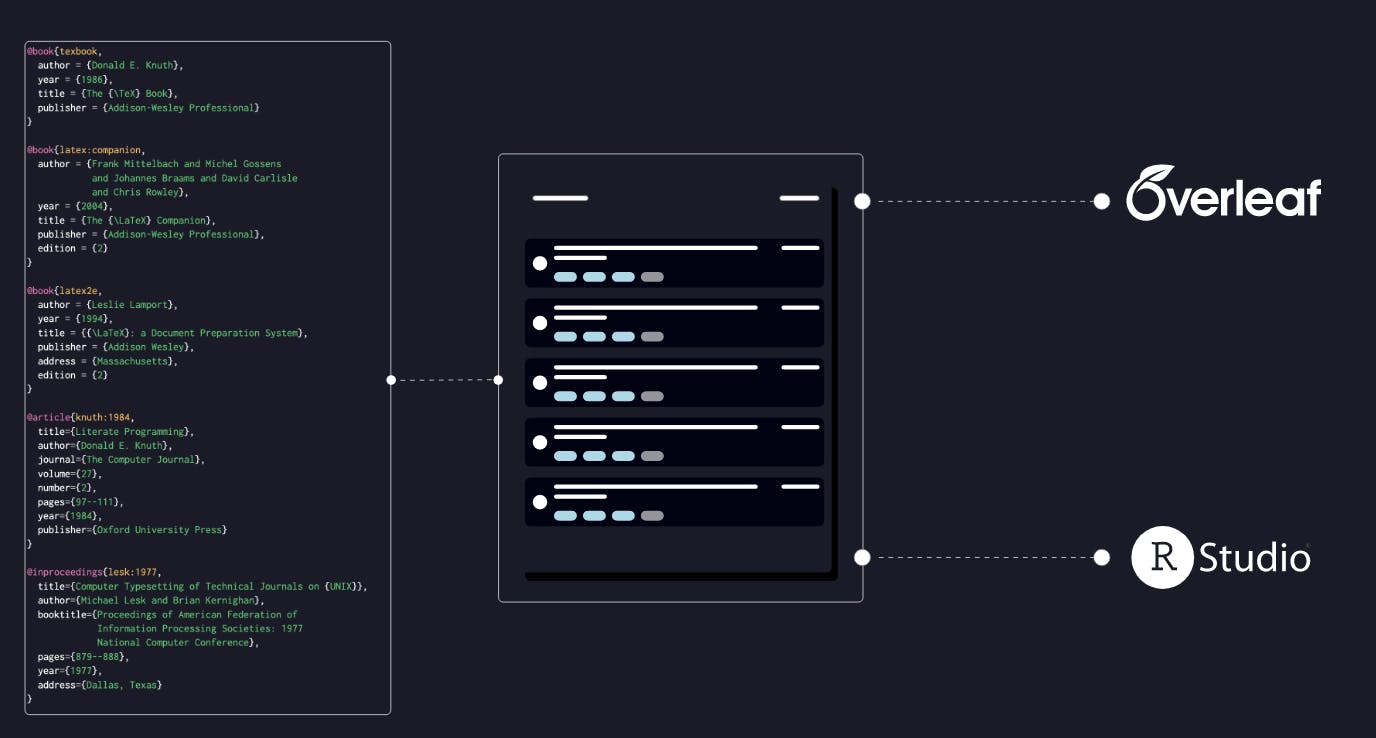
We complement the R Markdown system and put reference management between the entire pipeline, i.e., raw data, to high-quality documents, reports, and presentations. You export your bibliography in the desired citation style to publication-ready PDFs, Jupyter Notebooks, LaTeX, web pages, books, MS Word, etc.

At CiteDrive, you create an R Markdown project where you can store your references centrally to separate them from your R Markdown workflow. With our in-house R package, you can synchronize the current status of your bibliography with the RStduio project at any time and fully automatically - just like with Overleaf. Obsidian, Quarto, and Roam Research will follow.

Based on our users’ feedback and many drafts and prototypes we have been working on for months, the next update will significantly improve the user experience. For example, how to better organize BibTeX references has been addressed. The user can easily manage each reference with tags.
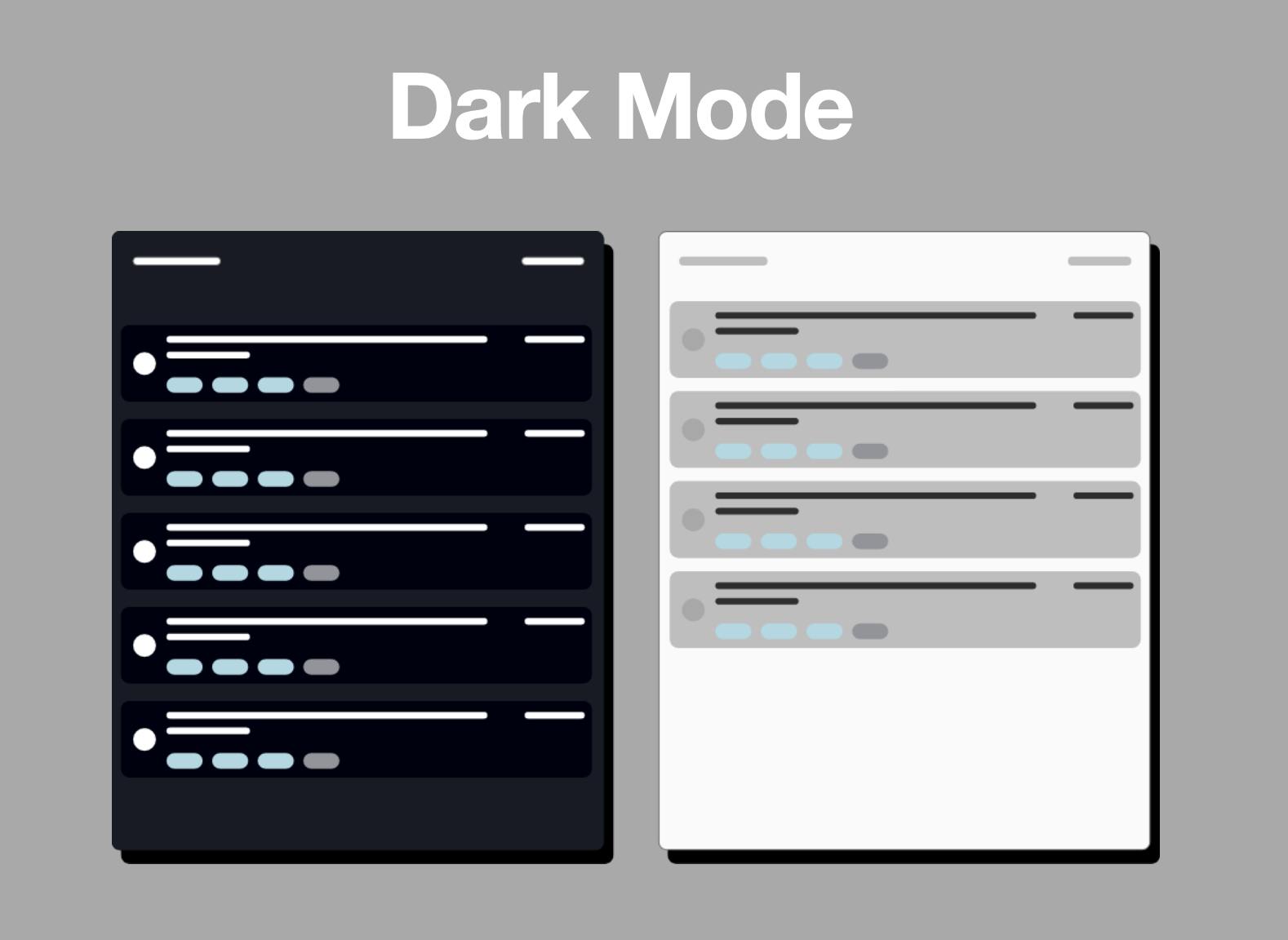
The second focus was on the problem of long-lasting user interfaces with better accessibility - for example, through optimal font sizes and colors - without giving up the distinctive style.

The dark mode is as well thought out and styled as the original - and offers much more than just a black background.

CiteDrive is a reference manager based entirely on BibTeX. But what does that mean strictly - especially for the next version? Apart from some suitable desktop applications (JabRef, for example), BibTeX seems to have an afterthought with many reference managers. One collects references in a database and exports them with an internal converter, resulting in a .bib file that omits many fields that the user might need. Also, manual editing with form fields is annoying. It was easier for many of our users to enter their bibliographies by hand into a text file.

And therein lies the compromise in CiteDrive — the ease of manual maintenance and the ability to organize and search for references in a straightforward user interface. Instead of using forms, we allow users to add and maintain their references with BibTeX entries via a code editor.
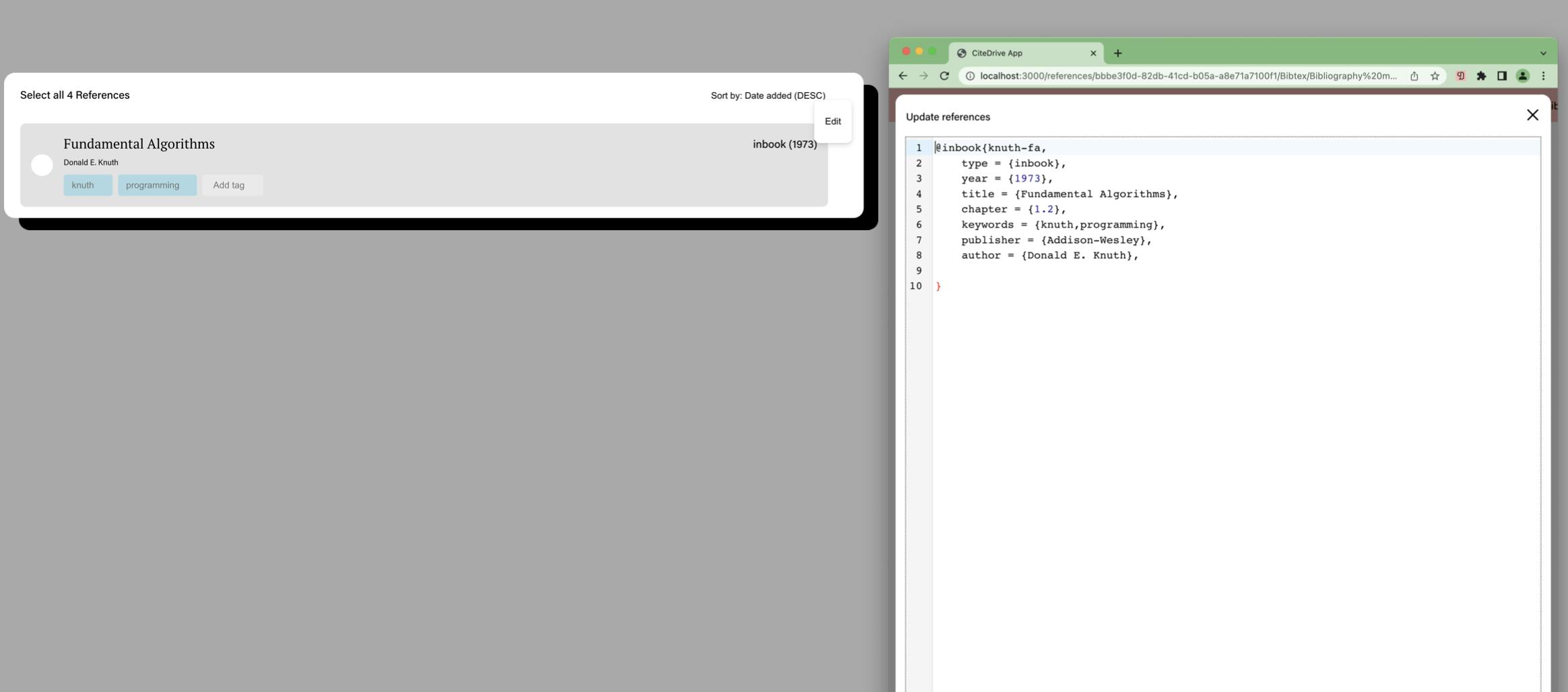
In the last update we released in January, we introduced this code editor and found that the idea was as well-received as it was by us. We’re extending it to include better highlighting of inline LaTeX markups, color-coded within BibTeX entries.

Some headaches for us and our users are the CitationKeys. On the one hand, we want to give users the option to use any CitationKey. On the other hand, we also want to provide them with the opportunity to create them automatically. For example, if the user previously used AUTOKEY as the CitationKey, it was generated:

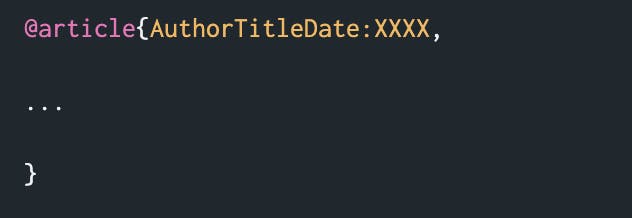
The result is a key consisting of the first author’s name, the first non-breaking word of the title, the year, and a deterministic suffix. Doing so will ensure that your LateX document / Overleaf project does not contain compilation errors.

If you had a duplicate reference in your project, the system would automatically append a suffix with AUTOKEY that enumerates the number of duplicates.
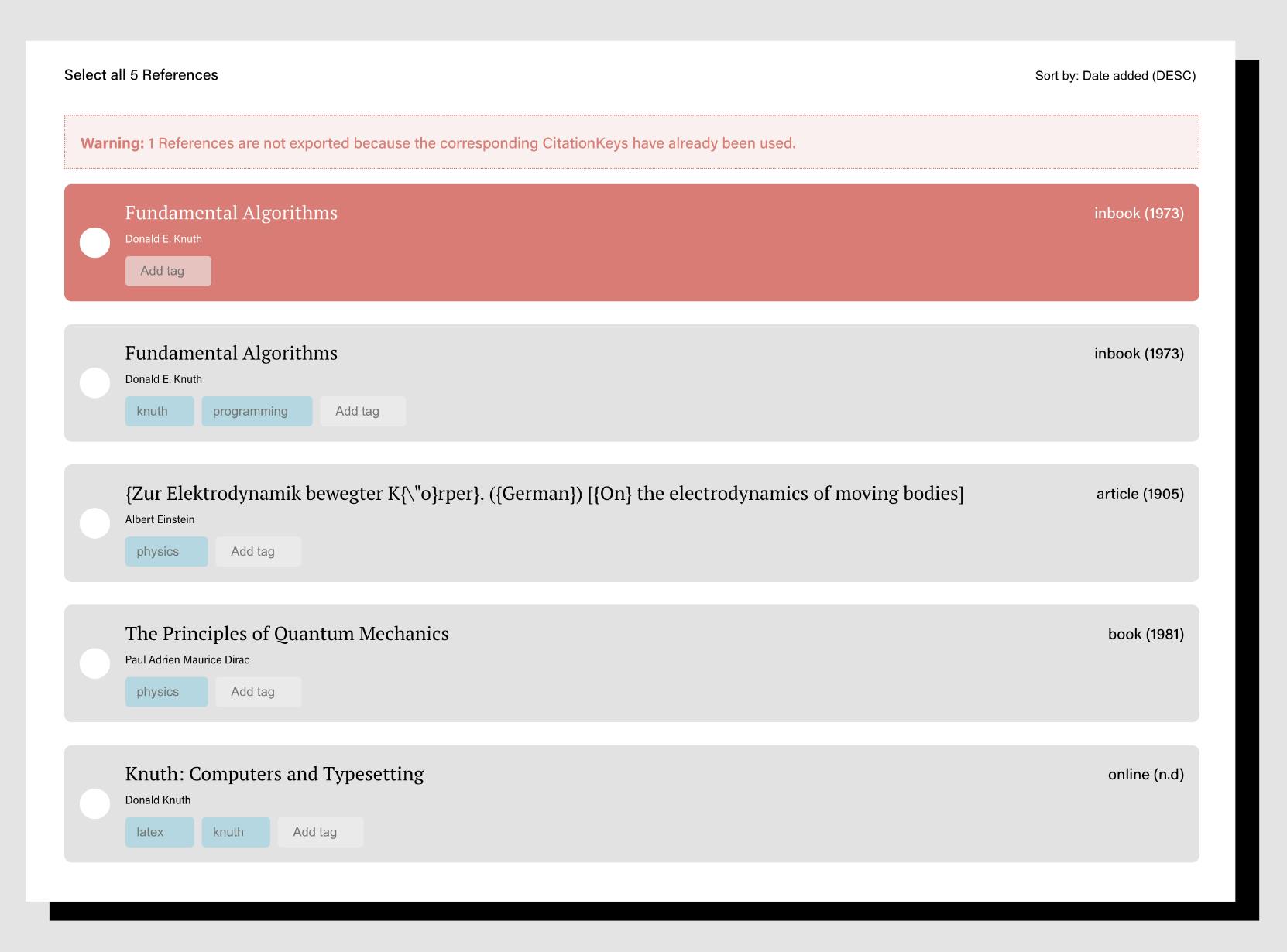
If we detect a duplicate citation key, the reference is highlighted in red and displays a warning. CiteDrive does not export identical references to the Overleaf project, which leads to errors in the LaTeX document.

Since the first alpha release, we have used React and Typescript for the frontend, using the boilerplate Create React app. We have carried over many packages and settings leftover from the alpha version into the current version. Also, we have completely rethought the whole architecture and optimized scripts, and we are now moving to Vite.

Overleaf is a finalist in the Digital Leaders Impact Awards 2022

Overleaf was named a finalist at the 6th Digital Leaders Impact Awards 2022 after making the top 3 in the Education category!

Test

We are delighted to announce that our friends at Overleaf are finalists in the 6th Digital Leaders Impact Awards 2022.

The Digital Leaders Impact Awards aims to recognize digital technology innovations that improve people’s lives. Individuals, companies, government agencies, or non-profit organizations can apply.

Overleaf is nominated in the top three in the education category, recognizing its efforts to create a collaborative real-time online latex editor used by over 9 million users.

There will also be a People’s Choice Award from Digital Leaders, honoring the most popular finalist through a public vote! You can help them win this award by voting for them. Voting is open until 9 March.

Please click on this link here and help them win. And if you have time, it would be amazing to share this with your friends. :)

The winners will be announced at the Impact Awards Ceremony on 10 March at the Ministry of Sound in London.

CiteDrive January 2022 Release

Happy new year guys! We have been hard at work in the background building a better reference management experience based on all of the amazing feedback we received from users like you.

On behalf of the entire CiteDrive crew, we hope everyone has had a wonderful holiday season and is ready to embark on an exciting 2022! The team has been hard at work in the background these last couple of months building a better reference management experience based on all of the amazing feedback we received from users like you.

Here are some of the highlights we’re proud to announce for the January 2022 release of CiteDrive:

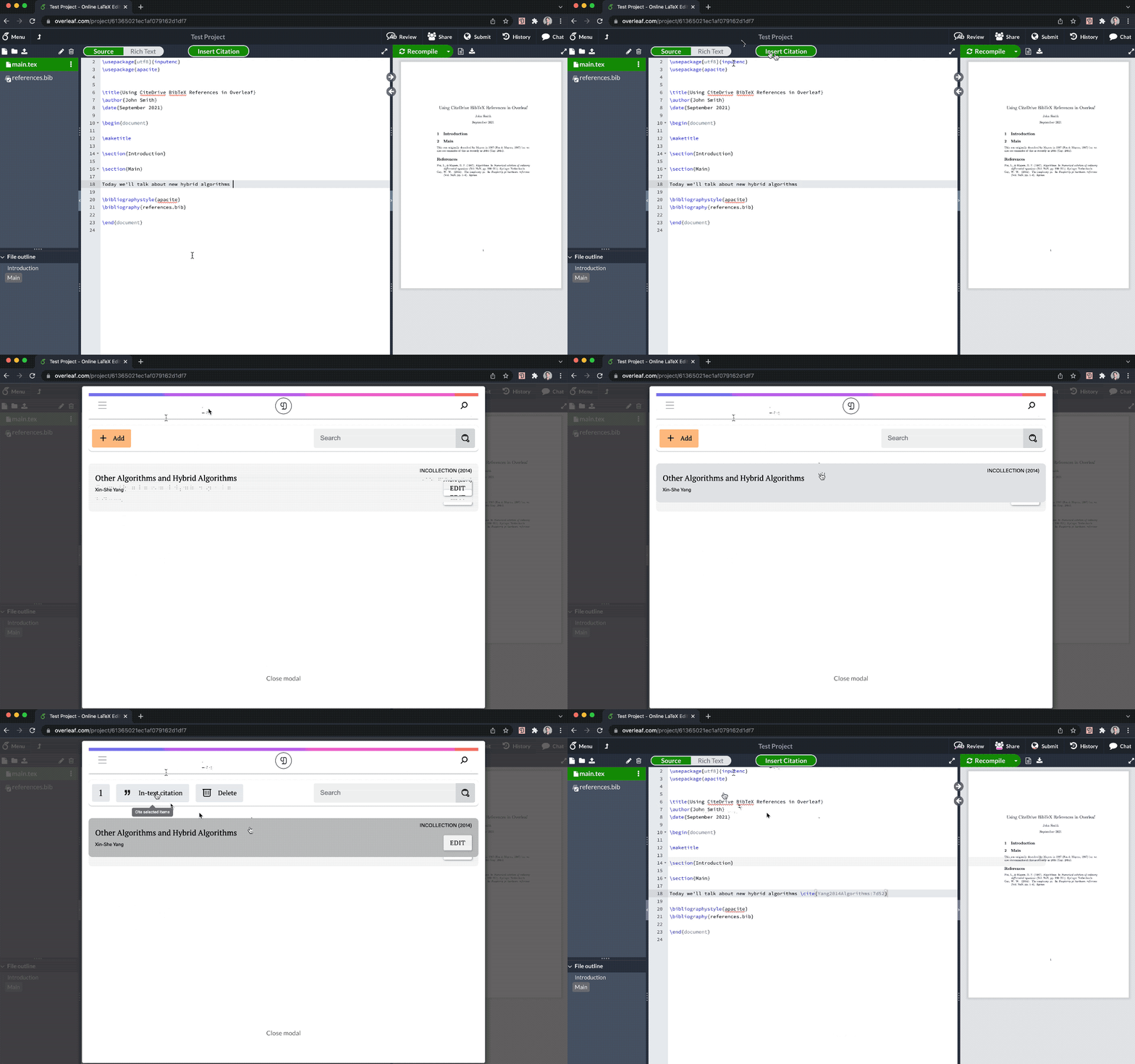
As a continuation of our efforts to simplify reference management, reduce clicks and generally remove tedium, we’ve leaned into our collaboration with the Overleaf team to introduce the in-editor experience. With the CiteDrive Companion browser add-on installed, you’ll notice a new “Insert Citation” button added to your Overleaf screen:

Clicking this button will present you with a direct view of the references available in the selected CiteDrive project. As you select one or more references from your project, you can click “In-text citation”, at which point the CiteDrive Companion will directly insert your in-text references into your current editor location.

As we continue to evolve the integration between CiteDrive and Overleaf, we will strive to make the entire end-to-end experience seamless so that you can focus your time on research and writing — not on tools.

Although the CiteDrive Companion add-on already empowered you to seamlessly capture articles and web pages at the point of browsing, you can now enjoy the same benefit with ISBN lookups and untagged DOIs. While viewing a page that contains the ISBN of a book you’d like to add to your project, simply select/highlight the ISBN and right-click:

From the pop-up menu, select CiteDrive Companion and Search ISBN. You can then seamlessly add the book to your project just as you would an article or webpage.

If you’re one of the many LaTeX users who already have a BibTeX-based collection of references you’d like to import into CiteDrive, we’re excited to share that it’s now a breeze to directly paste and import BibTeX references into your project. From within your CiteDrive project, simply click Add > Paste BibTeX Code and paste your existing BibTeX into the provided field:

Further doubling down on support for our BibTeX users, you now have the ability to customize the generated BibTeX for references before you add them to your project:

Modify anything from BibTeX tag type, reference key, and standard BibTeX attributes to adding fully custom attributes. All attributes will carry over to your hosted references. bib file when working with an editor such as Overleaf.

  • Customizable, human-readable citation keys vs. UUID-based keys
  • Extended BibTeX fields (e.g. BibLaTeX)
  • More robust DOI and content detection in the CiteDrive Companion plugin
  • Many other incremental improvements

We’re excited to hear your thoughts and feedback as we continue to build the world’s best reference management experience for LaTeX authors. Try it out at citedrive.com and share your thoughts with us at hello@citedrive.com